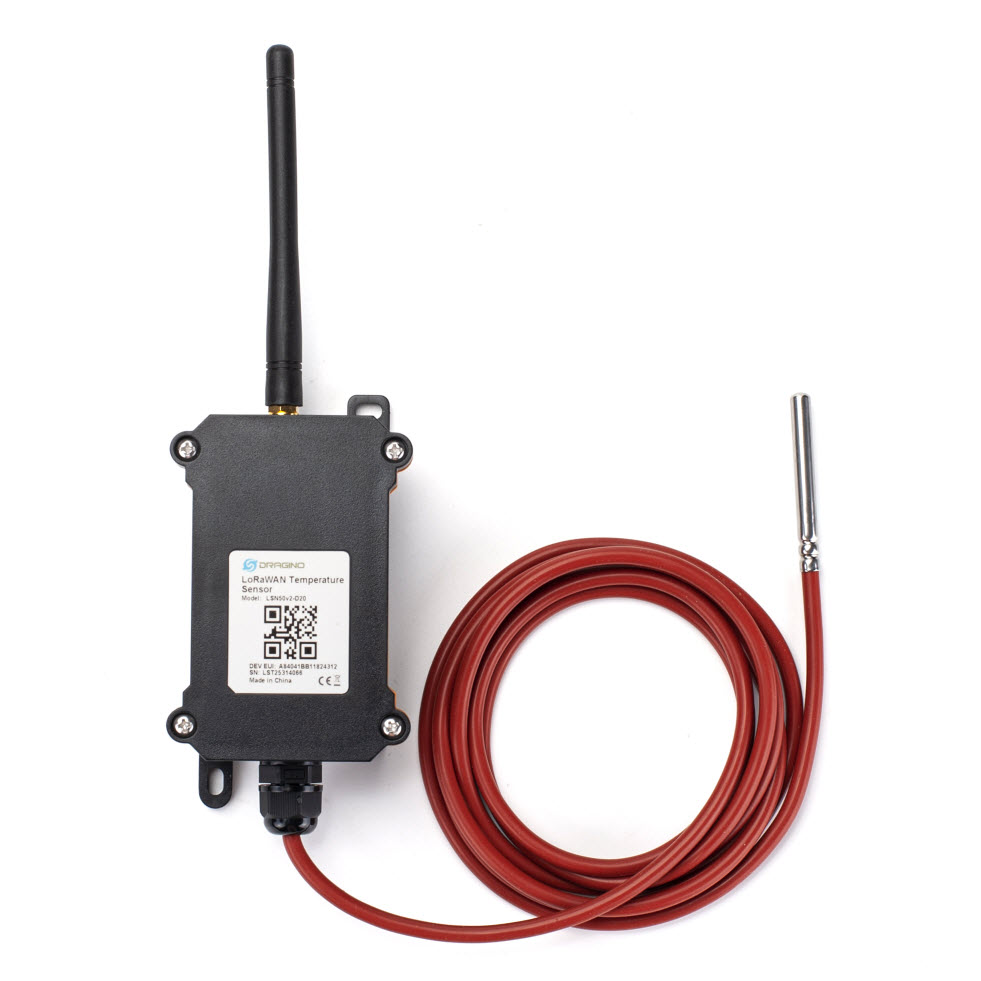
Dragino - LSN50v2-D20
- Manufacturer: Dragino
- Product: LSN50v2-D20
The LSN50v2-D20 is a LoRaWAN Waterproof Outdoor Temperature Sensor with 1 external Probe.
Table of contents
- Specifications
- Documents/Links
- Ordering Info
- Device specific Information
- Adding the Device to TTN
- Optional Settings
- Payload Decoder
Specifications
- indoor/outdoor device
- 1 External Sensor (DS18B20, cable length 2 m)
- Temperature, -55 … +125 [°C], ± 0.5 (max ±2.0 °C)
- Power Supply: 1 built in 8500mAh Li-SOCI2 battery
- Expected life time: depending on usage, 5 … 10 years
- LoRaWAN version: 1.0.3
- LoRaWAN device class: A
- Protection: IP66
- Operating Temperature: -40 … 85°C
- Size: 124 × 63 × 42 mm
Documents/Links
- Payload description (2023-08-09)
- Datasheet from dragino.com (2026-07-17)
- User Manual (online)
- Datasheet Temperaturesensor DS18B20
Ordering Info
- Part Number: LSN50v2-D20-EU868
- Remark: The LSN50v2-D20 is phased out at most distributors. The successor is the Dragino D20-LB (ca. CHF 65.-, 17.07.2026)
- Attention: The D20-LB uses a different payload format, so this page and its payload decoder do not apply to it.
Device specific Information
Switch on the device
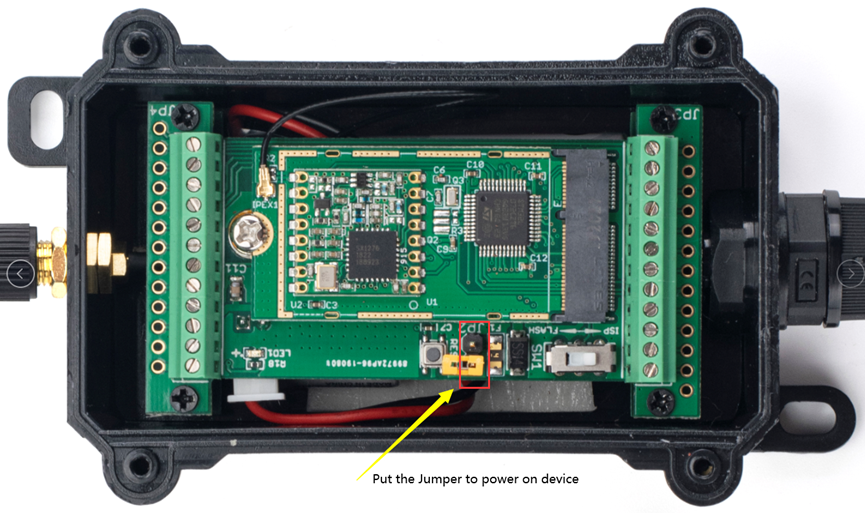
Out of the factory the device is switched off. To power on the LSN50v2-D20, open the case and set the jumper (connect the two pins):
Adding the Device to TTN
- The
JoinEUI,App EUIand theDevEUIshould be on a sticker on the cardboard box. - Before a device can communicate via “The Things Network” we have to add it to an application.
- Create a new application
- Under
End devicesin the application click(+) Register end device - Under
Input methodselectEnter end device specifics manually - Under
Frequency planselectEurope 863-870 Mhz (SF9 for RX2 - recommended) - Under
LoRaWAN versionselect1.0.3 - Under
JoinEUIenter theApp EUIfrom the App and pressConfirm - Enter as well the
DevEUIand theAppKeyfrom the App - Set an end-device name
- Press
Register end device - Add the payload formatter from below, either to the device itself or if all devices in the app are from the same type, to the application
- Switch on the device
- Close the case
- After Configuration, the device restarts automatically and tries to join the network
- Now the device should join the network and you can see the incoming telegrams in the
Live datasection
Optional Settings
Change sampling interval
Out of the factory the device measures and transmits every 20 minutes.
To change the sampling interval, you have to send the device configuration telegrams (Downlink-Messages). The interval is the time in seconds (hex encoded) at which the sensor measures and transmits the current values.
- In the TTN Console on the device view, select the device and change to the tab
Messaging, selectDownlink - Change the
FPort to 2 - Copy/paste the payload, e.g.
01000258into thePayloadfield to set interval to 10 minutes - Press
Send - In the
Datatab you should now see the scheduled telegram. The device only receives downlink data after an uplink. Therefore either wait for the next periodic uplink or open the case and press theACTbutton on the PCB once short to trigger an uplink
Examples
‘0100’ is an identifier, the rest represents the sampling interval in hex
- 5 Minutes Interval: ‘0100012C’ (300s in hex are ‘012C’)
- 10 Minutes Interval: ‘01000258’ (600s in hex are ‘0258’)
- 15 Minutes Interval: ‘01000384’ (900s in hex are ‘0384’)
- 60 Minutes Interval: ‘01000E10’ (3600s in hex are ‘0E10’)
Payload Decoder
function mapBatteryVoltageAbs(voltage) {
  if (voltage < 3.35) {
    return 0; // Critical
  } else if (voltage < 3.45) {
    return 1; // Warning
  } else if (voltage < 3.55) {
    return 2; // Good
  } else {
    return 3; // Very Good
  }
}

function decodeTemp(hi, lo) {
  if (hi === 0xff && lo === 0xff) {
    return 32767.0; // kein Sensor angeschlossen
  }
  return parseFloat(((hi << 24 >> 16 | lo) / 10).toFixed(1));
}

function decodeUplink(input) {
  var port = input.fPort;
  var bytes = input.bytes;
  var data = {};

  if (port !== 2) {
    return { errors: ["unknown FPort"] };
  }

  if (bytes.length !== 11) {
    return { errors: ["unexpected payload length"] };
  }

  var mode = (bytes[6] & 0x7C) >> 2;
  data.mode = mode;

  // Bytes 0-6 sind in Mode 0, 1, 3, 4, 5 identisch aufgebaut
  data.battery_volt_abs = (bytes[0] << 8 | bytes[1]) / 1000;
  data.battery_state_abs = mapBatteryVoltageAbs(data.battery_volt_abs);
  //data.alarm_state_abs = (bytes[6] & 0x01) ? 1 : 0;
  //data.digital_input_abs = (bytes[6] & 0x02) ? 1 : 0;
  //data.adc_volt_abs = (bytes[4] << 8 | bytes[5]) / 1000;
  data.temperature_degrC_abs = decodeTemp(bytes[2], bytes[3]);

  if (mode === 3) {
    // 3DS18B20-Modus: zwei weitere Temperaturen
    //data.temperature2_degrC_abs = decodeTemp(bytes[7], bytes[8]);
    //data.temperature3_degrC_abs = decodeTemp(bytes[9], bytes[10]);
  }

  return { data: data };
}